Say it. Stock it. Savor it.
The kitchen app you talk to. Say what you brought home, see what needs eating first, and turn what you have into dinner, together with your family.
Launching soon. See voice in action · Follow the launch
Save the recipes you find
Saw it on your feed? Save it in a few taps.
See a recipe you love? Tap Share, choose Import Recipe, and Stocky gets the ingredients and steps ready for you to check.
- Spot a recipe on your feed
- Tap Share
- Choose Import Recipe
- Stocky reads the recipe
- Ingredients and steps, ready to save
It reads the video too
When a reel's or TikTok's caption has no recipe, Stocky (AI) can watch the video (8 seconds to 3 minutes) and write the recipe out for you to check. YouTube Shorts work by their link. While signed in, Free includes 5 video reads a month; Premium has no limit.
In the cook's own words
Numbered steps stay whole, “a pinch of love” stays under From the Cook, and “thighs or breasts” becomes a choice you can change. A range like 1–2 tsp reads Using 1 tsp, with Change beside it.
Checked before you save
Lines worth a second look are marked Check this line, and Edit Before Saving lets you fix anything first. With Premium, read a recipe from up to three photos, get AI-suggested amounts a recipe leaves out, or Ask Stocky a question about a recipe (answers are marked as AI).
Voice first
Inventorying a whole kitchen never felt so easy.
Typing every item into an app is tedious, so kitchen lists fall behind. With Stock & Savor you unpack the bags and simply say what's going in, with each food's date, and the list keeps up with you.


4 ready
4 ready · Hold to edit, tap picture to hear




Talk at your own pace
Say each food and its date the way you normally would, quickly or slowly. Unpack while you talk, and the app works out the food, where it goes and its date.
It understands food
Brands land in their own field, and common mishearings like “catch up” can come back as Ketchup.
Nothing saves by surprise
Every food waits in Items to Add until you save. Hold one to fix a detail, or tap its picture to hear exactly what you said.
Don't want to talk?
Scan it or type a few letters. We'll look up the rest.
Some days you'd rather not talk. Scan the barcode on a box and its brand and size come with it when we know the product, or type a few letters and pick your food.




Over a million foods, ready
We catalogued two giant food databases, USDA FoodData Central and Open Food Facts, so over a million packaged foods are already in it.
Pick it, don't spell it
Matching foods appear as you type, each with its picture. Tap the right one and it's filled in.
Mix and match
Talk through the produce, scan the boxes, type the odd one out. However you add it, it all ends up in the same kitchen.
Use it up
Less food thrown away.
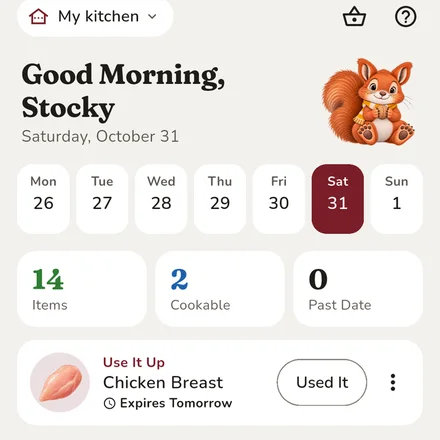
Spinach turns to slime in the back of the fridge because nobody saw it in time. Stock & Savor puts the food that needs eating at the top of Home, and can remind you as its date gets close.
 SpinachTomorrowSalmonIn 2 Days
 Greek YogurtIn 3 Days
 Cheddar CheeseIn 5 Days


See it at a glance
Every dated food shows how close it is to expiring; dates the app estimates say when to check instead. Dates are a guide: check the food, and when in doubt, throw it out.
Friendly reminders
Gentle notifications let you know when food is close to its date, at an hour you choose.
Recipes that rescue food
Smart recipe suggestions put food whose date is coming up into tonight's dinner for less waste.
Recipes
2,300+ curated recipes, plus every one you've saved.
Saved recipe links are easy to lose and hard to cook from. Bring the posts and recipe pages you love into one cookbook, next to recipes we've curated, and see what you can make with what's already home.
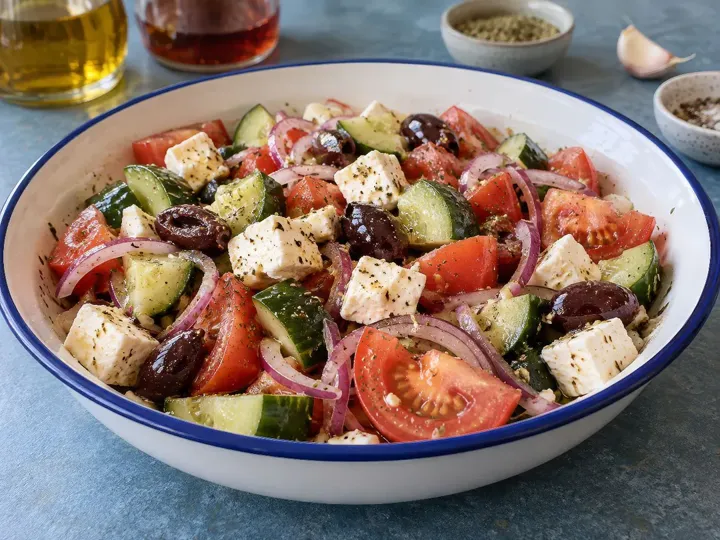
 Tomatoes
 Cucumber
 Feta
 Olive Oil
 Lemon
 Red Onion
 Bell Pepper
 Garlic
Share it, paste it, snap it or say it. Every recipe you save goes into one cookbook.
One cookbook for what you save
Share a post or link from Instagram, TikTok, YouTube Shorts, Facebook, Pinterest or recipe websites, paste the text, photograph a recipe card with Premium, or dictate Grandma's by voice.
Know before you start
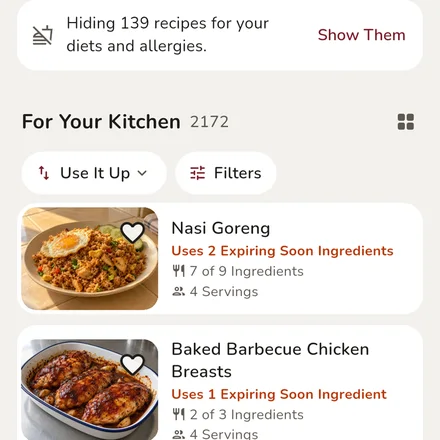
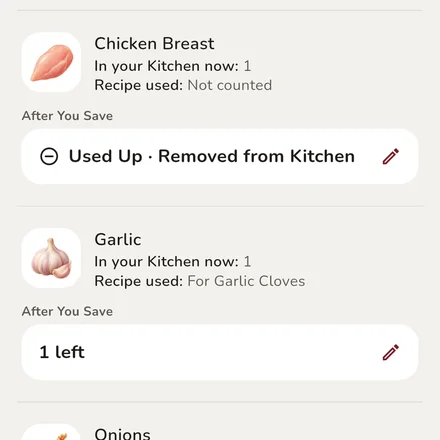
Every recipe shows what you already have, what's missing and what's optional, so you can check before you start.
Cooks for what you have
Cook Now shows recipes whose ingredients you have at home, and what's missing. Sort by Best Match to see the ones you already have most of the ingredients for, then add what's missing to your grocery list.
Nutrition, as the recipe says
When a recipe lists its nutrition, you see it on the recipe, and we can set it beside our own estimate, worked out from USDA data for each ingredient.
Cook Mode
Big steps, real timers. No scrolling with messy hands.
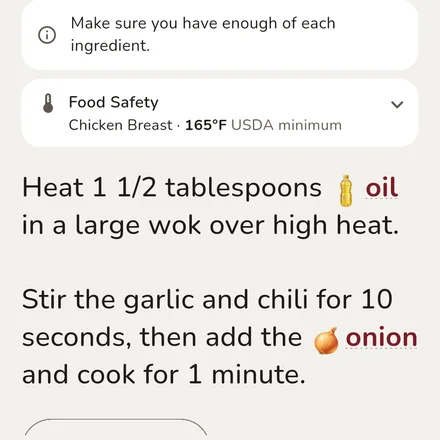
Cook Mode shows each step in large type, keeps the screen awake, and can ring when each timer is done (with notifications on). A timer can even remind you to flip or stir while it runs.
Sear the shrimp in a hot pan until pink, about 2 minutes per side.
Shrimp · cook until pearly and opaqueReadable from the stove
Large-type steps, with every ingredient's amount a tap away.
Timers that ring
Run several timers at once and name them. Lock your phone and each one can still ring, one sound at a time, with notifications on.
Reminders inside a timer
Get a nudge to flip steaks or stir a sauce. A timer can give a short reminder every few minutes and still ring at the end. Steps that say “stir every 5 minutes” suggest one for you.
USDA minimum temperatures
The USDA minimum shows for the foods that need one. Use a food thermometer.
Built with family in mind
One kitchen, run by everyone in it.
“What's for dinner?” and “Are we out of milk?” shouldn't be one person's job. With Family Premium, up to four people share one kitchen, Grocery List, recipes and meal plan: eating from it, updating it as they go, and deciding meals together.

Saturday Nov 7
 BreakfastFrench Toast5 of 6 Ingredients
 DinnerBaked Ziti7 of 9 Ingredients
Sunday Nov 8
 BreakfastBanana Bread6 of 7 Ingredients
 LunchLentil Tacos4 of 8 IngredientsDinnerHomemade Dinner Rolls5 of 6 Ingredients
Everyone keeps it current
Whoever finishes the milk marks it, so the kitchen stays up to date without one person chasing it.
Everyone gets a say in dinner
Tap New Meal Request to ask for a recipe from the family's book, the family votes Me Too, and the Head Squirrel or a Squirrel accepts it into the plan. Everyone, Visiting Squirrels too, can comment on requests and planned meals.
Dinner everyone can check
Shared allergies and diets show up on recipes, so everyone can see what a dish uses. Checks can miss ingredients; always read labels.
Family Plan Roles
Everyone on the family plan gets the shared family kitchen and every Premium feature on their own phone.
Sets up the family kitchen with Family Premium, invites everyone and picks each person's role.
Adds and changes food, the list, plans and recipes, and accepts meal requests.
Uses food up, adds to the list, asks for meals, votes and comments, but can't change food, plans or recipes.
For when Grandma and Grandpa come to stay: a Chipmunk's say in the kitchen until their leaving date, up to 14 days ahead, without taking a family seat.
Shopping
Shop the list. Stock the kitchen.
Tap Shop for This Week, check what the week's recipes are missing, and it lands on the list, sorted by aisle. Add or remove foods as you shop. When you're done, foods you've stocked before already know where they go.
Produce
 Avocados3
 Bananas6
Bakery
 Tortillas2
Drinks
 CoffeeAlways Keep
Changes on the go
The list sorts itself by aisle, and you can add or remove foods right in the store.
Staples come back
Mark coffee or eggs as Always Keep and they return to the list when you finish them.
Everything knows its place
Foods remember where they belong and fill right back in. Change the count if you bought more or less, or tap Put Away by Voice and say each food's date as you unpack.
Your Look
Your kitchen, your way. Even after dark.
Stock & Savor fits how you like to see things: picture tiles or a tidy list, phone or tablet, and a dark mode that follows your phone into the night.
AvocadosIn 3 DaysStrawberriesTomorrowSalmonIn 2 Days EggsIn 12 DaysCheddar CheeseIn 20 Days
 MilkIn 5 DaysAvocadosIn 3 DaysStrawberriesTomorrowSalmonIn 2 DaysEggsIn 12 DaysCheddar CheeseIn 20 DaysMilkIn 5 Days
A real dark mode
Charcoal, warm ivory and honey: the same screens, just darker. It turns on with your phone's dark or night mode, or choose it in Account.
Tiles or a list
See your kitchen as picture tiles or a tidy list, and the choice is remembered. The meal plan is a clear list of days you can fold away.
Made for tablets too
On a tablet, Home spreads into two columns with bigger recipe pictures, Kitchen tiles fill the width, and Cook Mode's steps grow wider and larger.
Your data, your call
What stays on your phone, and what doesn't.
The short version of our privacy policy, in plain words.
No account? It stays put
Without an account, your kitchen stays on your phone and isn't sent to us. With one, family kitchens sync for their members, and Premium backs up your own.
Standard voice stays on your phone
Standard voice becomes text on your phone. Its recordings stay there for replay for up to about a day (longer on a phone you rarely use), unless you attach one to a problem report. Premium voice, when it launches, is your choice: it sends what you say to Google's speech service only after you agree, and Google's own privacy terms cover that part.
AI, spelled out
Reading a recipe photo or a short recipe video, Stocky's suggested amounts and Ask Stocky send that photo, video, recipe or question to Google's Gemini AI. We don't add your name, email, diets or kitchen, so leave personal details out of what you send.
Diets stay yours
Diets and allergies are optional, shared with a family only if you agree, never used for ads and never added to what we send to AI.
Quiet lock screens
Notifications ask your phone to hide their details on the lock screen; your phone's settings decide. Family notices say only who did what unless you turn on Show Meal Names.
No analytics
The app has no analytics or crash-reporting tools of our own (Google's barcode scanner sends its own technical metrics). This website has no ads, analytics or cookies; its fonts load from Google Fonts. Delete your account in the app or from our website.
Our policies are drafts until launch.

Meet Stocky
A squirrel who keeps track of the stash
Stocky greets you on Home with the one thing worth knowing today, reads the recipes you import, and keeps you company while you add food.
FAQ
A few practical details
When does it launch?
Stock & Savor is being tested on real phones now, and accounts are open to invited testers. It launches on Google Play first, with the App Store after. Follow the launch to hear the day it's out.
Do I need to pay to use the app?
No. Your kitchen, grocery list, recipes, meal plan, voice, barcode scanning, reminders, recipe imports and Cook Mode are free, with 5 recipe videos read a month. Premium keeps your kitchen in your account and lifts the limits; Family Premium shares one kitchen. See the plans.
Is an account required?
No. Open the app and start adding food; it stays on your phone. Make an account later for video reads, Premium backup or a family kitchen. Accounts are for people 13 and older (in the EEA and Switzerland, 16 unless your country sets a lower age), and sign-up asks only your birth month and year, which the app checks on your phone and never keeps.
Does it work offline?
Mostly. Your kitchen, grocery list, the built-in recipes, Cook Mode and barcode lookups live on your phone, and free voice turns speech into text on the phone. Importing a recipe, AI reads and family syncing need a connection; with an account, your phone keeps a copy of your kitchens to use offline.
What if voice gets a food name wrong?
Common mishearings are often corrected, like “catch up” becoming Ketchup. Every food waits in Items to Add, so you can fix it, or tap its picture to hear what you said, before saving.
How do recipe imports work?
Share a recipe's post or link to Stock & Savor, or paste its text. The app reads the caption or page (and, with AI, while you're signed in, the video when the caption has no recipe), then shows the ingredients and steps for you to check and save.
Can it work around our diets?
It helps. Save the allergies and diets you avoid, like vegetarian or gluten-free, and recipes that list those foods are marked or hidden. When family members share theirs, a recipe that clashes for one of them is flagged. Always check labels yourself, too.
Is it for kids?
Accounts are for people 13 and older (in the EEA and Switzerland, 16 unless your country sets a lower age). In a family kitchen, the Head Squirrel can make anyone a Chipmunk, a role that uses food up, adds to the list and asks for meals, but can't change food, plans or recipes. It's a role, not an age.
Can I delete my account or get a copy of my data?
Delete it any time in the app at Account → Account & Security → Delete Account, or from our account deletion page. There's no in-app export yet; email us for a copy of your account data, as our Privacy Policy describes.
Why would I get Premium?
Premium keeps your food and places in your account, with your imported recipes' links, so you can use them on any phone you sign in on, reads recipe videos with no monthly limit, reads recipes from photos and lets Stocky suggest missing amounts. Family Premium connects up to four people in one kitchen, each with Premium.